
The guide checks visible marketplace information. It cannot certify licensing, authenticity, fabric performance or future print durability.
Identify season, team and garment
Begin with the exact season, club or national team, home or away design and garment type. A seller may group training tops, fan shirts, player versions and goalkeeper jerseys under one title. Compare collar, panel pattern, colour blocks and sponsor layout before assuming two images show the same product.
Record the selected family in plain language. If the listing title covers dozens of styles, the option screenshot becomes essential evidence. A spreadsheet row should not describe one famous player when the destination defaults to another team or an unprinted shirt.
Separate fan and player versions
Listings may distinguish versions by cut, material description, ventilation panels or badge application. Treat these as seller-provided specifications. Compare the images and size chart attached to the selected version, because a player-style cut can use different measurements from a fan version.
Do not assume the more expensive version is automatically better or authentic. The useful question is whether the option is clearly identified and whether its measurement evidence fits the intended wearer. Save the wording exactly as shown.
Audit name and number options
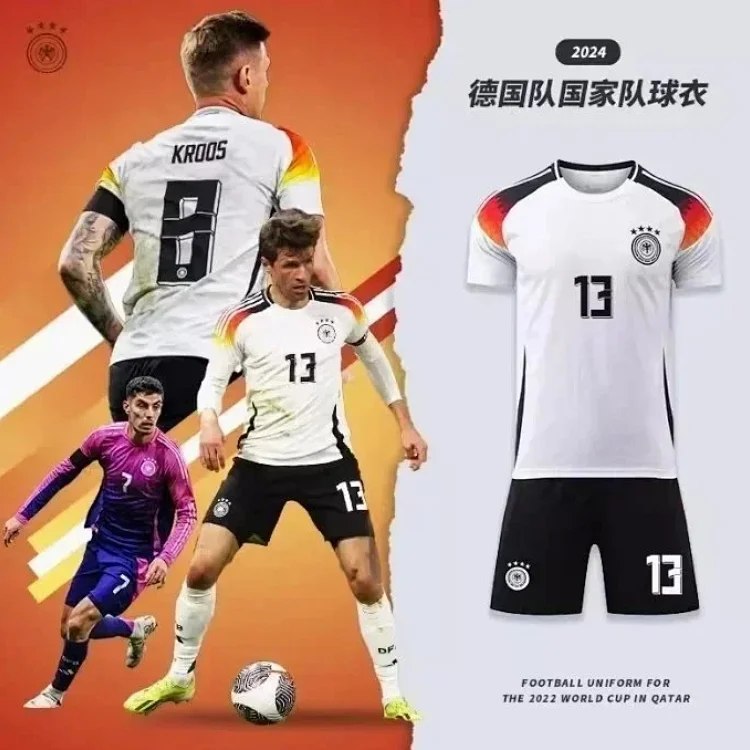
Confirm whether the shirt is blank, pre-printed or customisable. For a player option, record spelling, number and whether the photographs show the same season and typography. If custom text is possible, check character limits and how the order note must be supplied. Never infer included printing from a promotional image.
Look for evidence of front sponsor, back name and number, sleeve marks and lower labels. Mixed examples can show the range rather than the exact order. The selected option and order note should remove ambiguity before payment.
Check patches and competition details
Patch options may be separate, bundled or shown only in sample photographs. Identify competition, sleeve and championship patches individually. Confirm whether the chosen price includes them. A thumbnail with patches does not prove the base option will arrive with the same set.
Save the option image and wording. Later warehouse photos should be checked for presence, side, orientation and visible damage. Keep the conclusion visual: photos cannot establish official licensing or long-term adhesion.
Compare garment measurements
Use chest width and body length from a well-fitting shirt, then add shoulder or sleeve when the listing provides them. Match the seller's measurement method and distinguish flat width from circumference. Do not select solely from a familiar national size label.
If children and adult sizes share one page, verify which chart belongs to the chosen option. If player and fan versions have separate charts, do not mix them. Allow personal fit preference, but avoid pretending one height-and-weight suggestion is universally correct.
Review print and seam alignment
Use collar, centre line, shoulder seams and side panels as references for badges, sponsors, names and numbers. Check whether graphics are centred and whether front and back examples are consistent. Camera angle can create apparent skew, so compare more than one image.
At the listing stage, the goal is to understand what the seller claims. At warehouse arrival, the real unit becomes the subject. Keep both records and focus any additional photo request on a decision-changing detail.
Check complete cost fields
The headline price may apply to a blank shirt, smallest size or base version. Open the exact combination of garment, size, name, number and patch. Add domestic delivery when comparing sellers. Do not describe the result as a final delivered price, because international shipping is separate.
If the option grid cannot show which extras are included, ask before purchase or reject the listing. Paying first and hoping warehouse photos clarify the order is a weak strategy when the ambiguity is already visible.
Evaluate seller and listing consistency
A useful jersey page should keep season, version, print choices and size chart consistent across title, images and options. Check seller identity, domestic delivery and visible after-sales wording, but do not treat one store score as a guarantee. Stable, specific listing evidence matters more than a large promotional claim.
Review comments cautiously. A report that names the version, chosen size and visible print result provides context; a one-word rating does not solve your decision. Different buyers can receive different options or batches, so keep individual reports separate from verified fields.
Prepare a jersey photo checklist
Before ordering, list front badge, sponsor, collar, side panels, back name, number, sleeve details, patches, hem label, selected size and any custom text. This becomes the later warehouse review order. A complete checklist prevents attention from stopping at the front image while a missing patch or wrong back print goes unnoticed.
If a decision-changing area is absent, request one targeted view. Keep the original listing and option screenshot. Judge visible agreement only; warehouse photos do not certify licensing, material performance or how a print will behave after washing.
Maintain the jersey spreadsheet row
Date every check and name the exact version in the row. If a seller replaces a season or reorganises options, update the title and image or remove the entry. Do not let an old player name remain attached to a destination that now defaults to a blank or different shirt.
Use click data to identify rows worth frequent review. A popular jersey link that has become ambiguous is a higher maintenance priority than a rarely opened reference. Accuracy should guide updates, not the desire to keep an inflated product count.
Compare candidate rows consistently
Align the same fields for every candidate: season, team, home or away, fan or player version, blank or printed, chosen name and number, patch set, size chart, selected price, domestic delivery and date checked. Missing fields should remain visible. This prevents a base blank jersey from being compared with a fully printed option as if they were identical.
Limit the shortlist to a few understandable pages. More rows do not improve a spreadsheet when they repeat the same ambiguous seller images. A smaller set with exact version and print information gives search visitors a clearer reason to click and continue. It also makes later link maintenance realistic, because every high-interest row can be reopened and compared with the current option page.
Make the final jersey decision
Score identity, version, size evidence, print selection, patch selection, coherent images, seller information and domestic delivery. Stop for unclear season, blank-versus-printed status, child-versus-adult sizing or partial-payment wording.
Recheck the live page immediately before payment and keep the saved record. A curated USFans jersey find should explain the exact choice and its unknowns. That provides more value than a long list of teams without version, print or size verification.
Verify a personalised option before payment
Write the exact name, number and patch choice as they appear in the selected order. Check spelling, character order and whether the listing distinguishes a printed option from a blank garment. Save the option selection and any confirmed instruction together. A photograph of a player wearing a shirt does not specify what a seller will print on your own item.
Separate season, team, home or away design, fan or player version and size. Similar names can refer to different cuts, details and included patches. Do not use the measurements from one version to promise the fit of another. If the seller chart does not identify its version, resolve that ambiguity before paying.
Customisation can change the available after-sales options, so read the current terms for the selected product rather than assuming the normal return-request process covers every personalised item. At warehouse stage, inspect the actual print and labels promptly and document an observable mismatch with the saved order record. Keep unresolved items out of international parcel submission.